

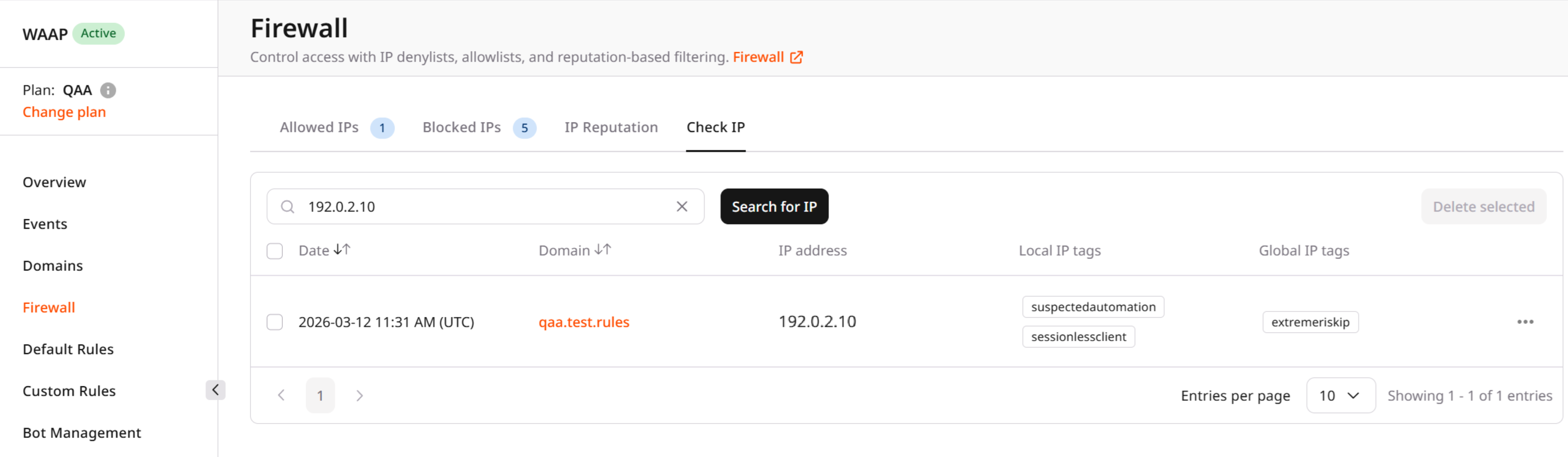
Results table
The table displays the following information:| Column | Description |
|---|---|
| Date | The date and time when the activity from the IP address was detected. |
| Domain | The domain where the activity occurred. |
| IP address | The detected IP address. |
| Local IP tags | Reputation tags assigned by WAAP based on behavior observed for your protected domain. |
| Global IP tags | Reputation tags assigned globally based on threat intelligence and activity observed across the platform. |
Reputation tags
Reputation tags indicate the type of behavior associated with the IP address. These tags help identify potentially malicious or automated activity. Examples of tags include:- suspectedautomation — the IP shows signs of automated traffic.
- rapidbehaviour — the IP generates an unusually high number of requests.
- ipinjectedfastclient — the IP may be associated with injection or abnormal client behavior.
- lowriskip — the IP has a low risk level according to global reputation data.
Next steps
After identifying suspicious or malicious IP activity, you can take additional actions:- Block or allow the IP address using the Allowed IPs or Blocked IP tabs. See Allowed IPs and Blocked IPs.
- Review global reputation information about IPs. See IP reputation.
- Create advanced filtering rules based on multiple conditions such as IP, country, user agent, or request properties. See Custom Rules.